staticInjectorError(Platform: core)[AppComponent -> Http]: NullInjectorError: No provider for Http!

I went around and around in circles with this problem yesterday. Today, it seems to work, and I think I know why. I was following the advice given in this stackOverflow answer https://stackoverflow.com/questions/47492475/no-provider-for-http-staticinjectorerror and I converted everything as suggested:

Update: Angular v6+
For Apps converted from older versions (Angular v2 – v5): HttpModule is now deprecated and you need to replace it with HttpClientModule or else you will get the error too.
In your app.module.ts replace import { HttpModule } from '@angular/http'; with the new HttpClientModule import { HttpClientModule} from "@angular/common/http"; Note: Be sure to then update the modules imports[] array by removing the old HttpModule and replacing it with the new HttpClientModule.
In any of your services that used HttpModule replace import { Http } from '@angular/http'; with the new HttpClient import { HttpClient } from '@angular/common/http';
Update how you handle your Http response. For example – If you have code that looks like this
http.get('people.json').subscribe((res:Response) => this.people = res.json());
The above code example will result in an error. We no longer need to parse the response, because it already comes back as JSON in the config object.
The subscription callback copies the data fields into the component’s config object, which is data-bound in the component template for display.
For more information please see the – Angular HttpClientModule – Official Documentation

However, I couldn’t get it to work. This morning I was solving a different problem and I ended up changing the app.module.ts file and removing the HttpClientModule import. In the app.component.ts I kept the HttpClient import and in the class I used it as follows with updates to the pipe, map bit in the tutorial:

getUser(): Observable<any>{
  	return this.http.get('http://localhost:4200/api/user').pipe(
		map(respnse => <string[]> respnse)
	);
}

Now it works!!!!

ERROR in AppComponent cannot be used as an entry component.

Urgh! I got so bored with this error, I didn’t know what was going on.

I found out that there was a problem with my AppComponent which meant that my AppModule was complaining. What problem though? I had to compile my angular code to find out. When I used ng build or ng serve, I couldn’t work out what the problem was from the browser. Granted, this is all new to me, but I expected there to be a line number and a bit of searching in stackOverflow. However, I found that I could compile my code Ahead-Of-Time using this command: ng build –aot

Then I actually found the problem:

ERROR in : Unexpected value ‘AppComponent in C:/single-page/frontend/src/app/app
.component.ts’ declared by the module ‘AppModule in C:/single-page/frontend/src/
app/app.module.ts’. Please add a @Pipe/@Directive/@Component annotation.
src/app/app.component.ts(8,2): error TS2554: Expected 1 arguments, but got 0.

I had been trying to get the HTTP stuff to work and it wasn’t, and had changed the @Component to @Injectable for some reason. I must have copied it from somewhere. Anyway, I changed that and it worked. 

Note, you can get this error if you don’t format the @Component right too, for example if you stick a semi-colon on the end of it. 

@Component({})       – is ok

@Component({});     – is not ok

Errors importing from rxjs, v5 to v6 changes needed.

The example gave:

import { Observable } from 'rxjs/Observable';
import 'rxjs/add/operator/map';
import 'rxjs/add/operator/catch';
import 'rxjs/add/observable/throw';

but I had to change it to:

import { Observable } from 'rxjs';
import { map, catchError } from 'rxjs/operators';

This is because of updates moving from RxJS v5.x to v6 in August 2018. In my package.json file, I’m using  “rxjs”: “~6.3.3”

The previous coding style of chaining operators has been replaced by piping the result of one operator to another. Pipeable operators were added in version 5.5.

public isLoggedIn(username: string, password: string): Observable<boolean> {
    let headers = new Headers({'Content-Type':'X-custom'});
    let option = new RequestOptions({headers: headers});
    return this.http.get('./assets/login.json', option).pipe(
        map((res: Response) => {
            return res.json().username === username &&
                   res.json().password === password;
        }),
        catchError((error: any) => {
            return Observable.throw(error.statusText)
        }));
}

https://github.com/ReactiveX/rxjs/blob/master/docs_app/content/guide/v6/migration.md

Create a module, component

We’re using the CLI to create all the stuff we need. He says to open in IDE but he doesn’t say what IDE. I’ve got Atom, so I’m using that. Here I’m going to create a module, a component, and show that component’s styled html in the browser on localhost:4200.


Create a module

C:\git\login-app>ng g module login
CREATE src/app/login/login.module.ts (189 bytes)

The module is created under \login-app\src\app\login and contains one file  login.module.ts

import { NgModule } from '@angular/core';
import { CommonModule } from '@angular/common';

@NgModule({
declarations: [],
imports: [
CommonModule
]
})
export class LoginModule { }

The module is created. I just needed to add my new module to the application. See where is says export class LoginModule { }, well that’s the name I need to import into the main app (in bold).

import { BrowserModule } from '@angular/platform-browser';
import { NgModule } from '@angular/core';
import { AppComponent } from './app.component';
import { LoginModule } from './login/login.module';

@NgModule({
declarations: [
AppComponent
],
imports: [
BrowserModule,
LoginModule
],
providers: [],
bootstrap: [AppComponent]
})
export class AppModule { }

The example he show on screen he has FormsModule and HttpModule extra. I don’t know if it’s a vanilla CLI created project, or if he’s already added stuff to it and we’ll do that in the future?

import { BrowserModule } from '@angular/platform-browser';
import { NgModule } from '@angular/core';
import { FormsModule } from '@angular/forms';
import { HttpModule } from '@angular/http';
import { AppComponent } from './app.component';
import { LoginModule } from './login/login.module';

These are included in the imports bit too.


Create a component

Inside the module we can now create a component. We have to go inside the module first on the command line to login-app\src\app\login.

C:\git\login-app\src\app\login>ng g component authentication
CREATE src/app/login/authentication/authentication.component.html (33 bytes)
CREATE src/app/login/authentication/authentication.component.spec.ts (684 bytes)
CREATE src/app/login/authentication/authentication.component.ts (301 bytes)
CREATE src/app/login/authentication/authentication.component.css (0 bytes)
UPDATE src/app/login/login.module.ts (297 bytes)

A new folder is created under C:\git\login-app\src\app\login called authentication. It contains the html, css, spec (don’t know what that is – tests?) and the TypeScript class for the component. In the LoginModule created above, the component has been automatically added as an import and added to the declarations parameter. But we also have to add it to the exports to make it usable to any other modules that may use this module.

import { NgModule } from '@angular/core';
import { CommonModule } from '@angular/common';
import { AuthenticationComponent } from './authentication/authentication.component';
@NgModule({
  declarations: [AuthenticationComponent],
  imports: [CommonModule],
  exports: [AuthenticationComponent]
})
export class LoginModule { }

Show component

Let’s customize the html and css of the new component.

C:\git\login-app\src\app\login\authentication has all the files.

authentication.component.css

p {color: red;}

authentication.component.html

<p>Login component</p>

authentication.component.ts

import { Component, OnInit } from '@angular/core';
@Component({
  selector: 'app-authentication',
  templateUrl: './authentication.component.html',
  styleUrls: ['./authentication.component.css']
})
export class AuthenticationComponent implements OnInit {
  constructor() {}
  ngOnInit() {}
}

The bit we need is selector: ‘app-authentication’. This is the tag we need to use in the main application’s html page, to show our component.

C:\git\login-app\src\app\app.component.html

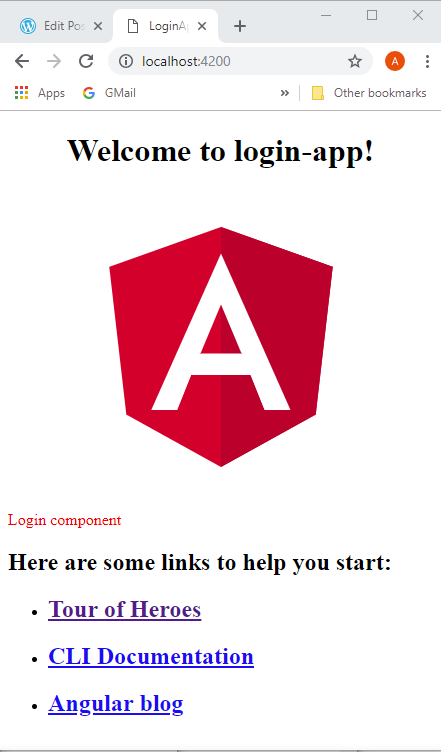
I just shoved it in under the title (in bold).

<!--The content below is only a placeholder and can be replaced.-->

Welcome to {{ title }}!

Angular Logo
<app-authentication></app-authentication> <h2>Here are some links to help you start: </h2> <ul> <li><h2><a target="_blank" rel="noopener" href="https://angular.io/tutorial">Tour of Heroes</a></h2></li> <li><h2><a target="_blank" rel="noopener" href="https://github.com/angular/angular-cli/wiki">CLI Documentation</a></h2></li> <li><h2><a target="_blank" rel="noopener" href="https://blog.angular.io/">Angular blog</a></h2></li> </ul>

Does it work? Yey!
angular2-2

OK, so now I kinda know what I’m doing, I don’t want to document the whole tutorial as I go along as it’s taking too long, and is probably against copyright (although what I’ve done so far is widely documented in tutorials across the web). I’ll just highlight any problems… of which there’ll be none… there’s positive thinking for you! 🙂

New tutorial started! O’Reilly Learning Path: Learning Web Application with Spring 5 and Angular 2 – Mario Romano

Ok, the other one sucked… it was just an overview of loads of stuff and no hand-holding… I need hand-holding as everything is all still so new.

I already have Node.js, and I have already created one Angular app, so I have the CLI too. He suggests updating it.

PS C:\xxx\git\spring5-angular2-mario-romano> node -v
v10.13.0
PS C:\xxx\git\spring5-angular2-mario-romano> npm -v
6.4.1
PS C:\xxx\git\spring5-angular2-mario-romano> npm update @angular/cli
PS C:\xxx\git\spring5-angular2-mario-romano> ng version

_ _ ____ _ ___
/ \ _ __ __ _ _ _| | __ _ _ __ / ___| | |_ _|
/ △ \ | '_ \ / _` | | | | |/ _` | '__| | | | | | |
/ ___ \| | | | (_| | |_| | | (_| | | | |___| |___ | |
/_/ \_\_| |_|\__, |\__,_|_|\__,_|_| \____|_____|___|
|___/


Angular CLI: 7.0.3
Node: 10.13.0
OS: win32 x64
Angular:
...

Package Version
------------------------------------------------------
@angular-devkit/architect 0.10.3
@angular-devkit/core 7.0.3
@angular-devkit/schematics 7.0.3
@schematics/angular 7.0.3
@schematics/update 0.10.3
rxjs 6.3.3
typescript 3.1.3

Let’s create a login app: > ng new login-app

From another tutorial I remember that they added stuff to the CLI, so I chose:

PS C:\xxx\git\spring5-angular2-mario-romano> ng new login-app
? Would you like to add Angular routing? No
? Which stylesheet format would you like to use? CSS

Well, it took a couple of minutes and some strange stuff happened in PowerShell.

PS C:\xxx\git\spring5-angular2-mario-romano> ng new login-app
? Would you like to add Angular routing? No
? Which stylesheet format would you like to use? CSS
CREATE login-app/angular.json (3795 bytes)
CREATE login-app/package.json (1316 bytes)
   ...etc...
npm WARN deprecated circular-json@0.5.9: CircularJSON is in maintenance only, flatted is its successor.

> node-sass@4.9.3 install C:\xxx\git\spring5-angular2-mario-romano\login-app\node_modules\node-sass
> node scripts/install.js

Cached binary found at C:\xxx\AppData\Roaming\npm-cache\node-sass\4.9.3\win32-x64-64_binding.node

> node-sass@4.9.3 postinstall C:\xxx\git\spring5-angular2-mario-romano\login-app\node_modules\node-sass
> node scripts/build.js

Binary found at C:\xxx\git\spring5-angular2-mario-romano\login-app\node_modules\node-sass\vendor\win32-x64-64\binding.node
Testing binary
Binary is fine
npm WARN optional SKIPPING OPTIONAL DEPENDENCY: fsevents@1.2.4 (node_modules\fsevents):
npm WARN notsup SKIPPING OPTIONAL DEPENDENCY: Unsupported platform for fsevents@1.2.4: wanted {"os":"darwin","arch":"any
"} (current: {"os":"win32","arch":"x64"})

added 1097 packages from 1163 contributors and audited 39132 packages in 262.922s
found 0 vulnerabilities

OK, this all seems fine. Then loads of these for different files:

warning: LF will be replaced by CRLF in .editorconfig.
The file will have its original line endings in your working directory.

Successfully initialized git.

Then things went weird! It looks like the console output was trying to run in  PowerShell, and PowerShell was complaining about it.

PS C:\xxx\git\spring5-angular2-mario-romano> PS C:\xxx\git\spring5-angular2-mario-romano> ng version
Get-Process : A positional parameter cannot be found that accepts argument 'ng'.
At line:1 char:1
+ PS C:\xxx\git\spring5-angular2-mario-romano> ng version
+ ~~~~~~~~~~~~~~~~~~~~~~~~~~~~~~~~~~~~~~~~~~~~~~~~~~~~~~~~~~~~~~~
+ CategoryInfo : InvalidArgument: (:) [Get-Process], ParameterBindingException
+ FullyQualifiedErrorId : PositionalParameterNotFound,Microsoft.PowerShell.Commands.GetProcessCommand

PS C:\xxx\git\spring5-angular2-mario-romano>
PS C:\xxx\git\spring5-angular2-mario-romano> _ _ ____ _ ___
_ : The term '_' is not recognized as the name of a cmdlet, function, script file, or operable program. Check the
spelling of the name, or if a path was included, verify that the path is correct and try again.
At line:1 char:6
+ _ _ ____ _ ___
+ ~
+ CategoryInfo : ObjectNotFound: (_:String) [], CommandNotFoundException
+ FullyQualifiedErrorId : CommandNotFoundException

PS C:\xxx\git\spring5-angular2-mario-romano> / \ _ __ __ _ _ _| | __ _ _ __ / ___| | |_ _|
>> / △ \ | '_ \ / _` | | | | |/ _` | '__| | | | | | |
>> / ___ \| | | | (_| | |_| | | (_| | | | |___| |___ | |
>> /_/ \_\_| |_|\__, |\__,_|_|\__,_|_| \____|_____|___|
>> |___/
>>
At line:1 char:29
+ / \ _ __ __ _ _ _| | __ _ _ __ / ___| | |_ _|
+ ~
An empty pipe element is not allowed.
At line:1 char:52
+ / \ _ __ __ _ _ _| | __ _ _ __ / ___| | |_ _|
+ ~
An empty pipe element is not allowed.
At line:1 char:54
+ / \ _ __ __ _ _ _| | __ _ _ __ / ___| | |_ _|
+ ~
An empty pipe element is not allowed.
At line:2 char:12
+ / △ \ | '_ \ / _` | | | | |/ _` | '__| | | | | | |
+ ~~~~~~~~~~~~~~~~~~~~~~~~~~~
Expressions are only allowed as the first element of a pipeline.
At line:2 char:39
+ / △ \ | '_ \ / _` | | | | |/ _` | '__| | | | | | |
+ ~~
Unexpected token '__' in expression or statement.
At line:2 char:42
+ / △ \ | '_ \ / _` | | | | |/ _` | '__| | | | | | |
+ ~
An empty pipe element is not allowed.
At line:2 char:46
+ / △ \ | '_ \ / _` | | | | |/ _` | '__| | | | | | |
+ ~
An empty pipe element is not allowed.
At line:2 char:48
+ / △ \ | '_ \ / _` | | | | |/ _` | '__| | | | | | |
+ ~
An empty pipe element is not allowed.
At line:2 char:52
+ / △ \ | '_ \ / _` | | | | |/ _` | '__| | | | | | |
+ ~
An empty pipe element is not allowed.
At line:2 char:54
+ / △ \ | '_ \ / _` | | | | |/ _` | '__| | | | | | |
+ ~
An empty pipe element is not allowed.
Not all parse errors were reported. Correct the reported errors and try again.
+ CategoryInfo : ParserError: (:) [], ParentContainsErrorRecordException
+ FullyQualifiedErrorId : EmptyPipeElement

It carried on like this until the end, but did also give out useful information in between:

PS C:\xxx\git\spring5-angular2-mario-romano> Angular CLI: 7.0.3
PS C:\xxx\git\spring5-angular2-mario-romano> Node: 10.13.0
PS C:\xxx\git\spring5-angular2-mario-romano> OS: win32 x64
PS C:\xxx\git\spring5-angular2-mario-romano> Angular:
PS C:\xxx\git\spring5-angular2-mario-romano> ...
PS C:\xxx\git\spring5-angular2-mario-romano> Package Version
PS C:\xxx\git\spring5-angular2-mario-romano> ------------------------------------------------------
>> @angular-devkit/architect 0.10.3

PS C:\xxx\git\spring5-angular2-mario-romano> @angular-devkit/core 7.0.
PS C:\xxx\git\spring5-angular2-mario-romano> @angular-devkit/schematics 7.0.3
PS C:\xxx\git\spring5-angular2-mario-romano> @schematics/angular 7.0.3
PS C:\xxx\git\spring5-angular2-mario-romano> @schematics/update 0.10.3
PS C:\xxx\git\spring5-angular2-mario-romano> rxjs 6.3.3
PS C:\xxx\git\spring5-angular2-mario-romano> typescript 3.1.3

Let’s check it out:

PS C:\xxx\git\spring5-angular2-mario-romano\login-app> dir

  Directory: C:\xxx\git\spring5-angular2-mario-romano\login-app

Mode LastWriteTime Length Name
---- ------------- ------ ----
d----- 08/11/2018 11:05 e2e
d----- 08/11/2018 11:09 node_modules
d----- 08/11/2018 11:05 src
-a---- 08/11/2018 11:05 245 .editorconfig
-a---- 08/11/2018 11:05 503 .gitignore
-a---- 08/11/2018 11:05 3795 angular.json
-a---- 08/11/2018 11:09 372452 package-lock.json
-a---- 08/11/2018 11:05 1316 package.json
-a---- 08/11/2018 11:05 1025 README.md
-a---- 08/11/2018 11:05 408 tsconfig.json
-a---- 08/11/2018 11:05 2837 tslint.json
PS C:\xxx\git\spring5-angular2-mario-romano\login-app> ng serve
** Angular Live Development Server is listening on localhost:4200, open your browser on http://localhost:4200/ **

Date: 2018-11-08T11:29:20.058Z
Hash: ae9a2e0aa03a148024ae
Time: 21309ms
chunk {main} main.js, main.js.map (main) 10.7 kB [initial] [rendered]
chunk {polyfills} polyfills.js, polyfills.js.map (polyfills) 223 kB [initial] [rendered]
chunk {runtime} runtime.js, runtime.js.map (runtime) 6.08 kB [entry] [rendered]
chunk {styles} styles.js, styles.js.map (styles) 16.2 kB [initial] [rendered]
chunk {vendor} vendor.js, vendor.js.map (vendor) 3.31 MB [initial] [rendered]
i 「wdm」: Compiled successfully.

In the broswer on http://localhost:4200/

angular2-1

Yippee!!!