
We’re using the CLI to create all the stuff we need. He says to open in IDE but he doesn’t say what IDE. I’ve got Atom, so I’m using that. Here I’m going to create a module, a component, and show that component’s styled html in the browser on localhost:4200.
Create a module
C:\git\login-app>ng g module login
CREATE src/app/login/login.module.ts (189 bytes)
The module is created under \login-app\src\app\login and contains one file login.module.ts
import { NgModule } from '@angular/core';
import { CommonModule } from '@angular/common';

@NgModule({
declarations: [],
imports: [
CommonModule
]
})
export class LoginModule { }
The module is created. I just needed to add my new module to the application. See where is says export class LoginModule { }, well that’s the name I need to import into the main app (in bold).
import { BrowserModule } from '@angular/platform-browser';
import { NgModule } from '@angular/core';
import { AppComponent } from './app.component';
import { LoginModule } from './login/login.module';

@NgModule({
declarations: [
AppComponent
],
imports: [
BrowserModule,
LoginModule
],
providers: [],
bootstrap: [AppComponent]
})
export class AppModule { }
The example he show on screen he has FormsModule and HttpModule extra. I don’t know if it’s a vanilla CLI created project, or if he’s already added stuff to it and we’ll do that in the future?
import { BrowserModule } from '@angular/platform-browser';
import { NgModule } from '@angular/core';
import { FormsModule } from '@angular/forms';
import { HttpModule } from '@angular/http';
import { AppComponent } from './app.component';
import { LoginModule } from './login/login.module';
These are included in the imports bit too.
Create a component
Inside the module we can now create a component. We have to go inside the module first on the command line to login-app\src\app\login.
C:\git\login-app\src\app\login>ng g component authentication
CREATE src/app/login/authentication/authentication.component.html (33 bytes)
CREATE src/app/login/authentication/authentication.component.spec.ts (684 bytes)
CREATE src/app/login/authentication/authentication.component.ts (301 bytes)
CREATE src/app/login/authentication/authentication.component.css (0 bytes)
UPDATE src/app/login/login.module.ts (297 bytes)
A new folder is created under C:\git\login-app\src\app\login called authentication. It contains the html, css, spec (don’t know what that is – tests?) and the TypeScript class for the component. In the LoginModule created above, the component has been automatically added as an import and added to the declarations parameter. But we also have to add it to the exports to make it usable to any other modules that may use this module.
import { NgModule } from '@angular/core';
import { CommonModule } from '@angular/common';
import { AuthenticationComponent } from './authentication/authentication.component';
@NgModule({
  declarations: [AuthenticationComponent],
  imports: [CommonModule],
  exports: [AuthenticationComponent]
})
export class LoginModule { }
Show component
Let’s customize the html and css of the new component.
C:\git\login-app\src\app\login\authentication has all the files.
authentication.component.css
p {color: red;}
authentication.component.html
<p>Login component</p>
authentication.component.ts
import { Component, OnInit } from '@angular/core';
@Component({
  selector: 'app-authentication',
  templateUrl: './authentication.component.html',
  styleUrls: ['./authentication.component.css']
})
export class AuthenticationComponent implements OnInit {
  constructor() {}
  ngOnInit() {}
}
The bit we need is selector: ‘app-authentication’. This is the tag we need to use in the main application’s html page, to show our component.
C:\git\login-app\src\app\app.component.html
I just shoved it in under the title (in bold).
<!--The content below is only a placeholder and can be replaced.--><app-authentication></app-authentication> <h2>Here are some links to help you start: </h2> <ul> <li><h2><a target="_blank" rel="noopener" href="https://angular.io/tutorial">Tour of Heroes</a></h2></li> <li><h2><a target="_blank" rel="noopener" href="https://github.com/angular/angular-cli/wiki">CLI Documentation</a></h2></li> <li><h2><a target="_blank" rel="noopener" href="https://blog.angular.io/">Angular blog</a></h2></li> </ul>Welcome to {{ title }}!

Does it work? Yey!
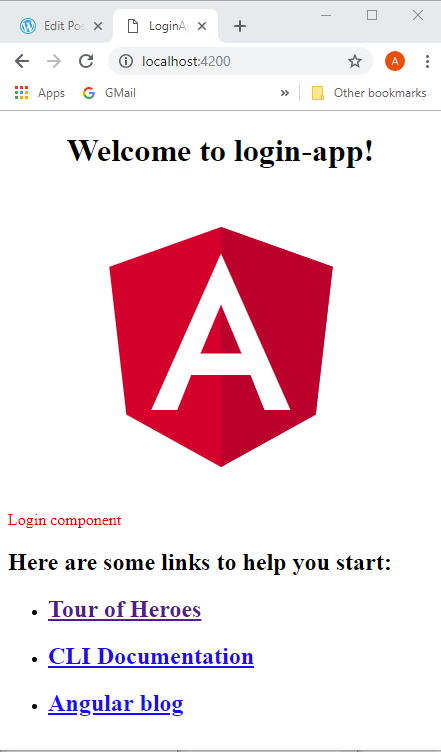
OK, so now I kinda know what I’m doing, I don’t want to document the whole tutorial as I go along as it’s taking too long, and is probably against copyright (although what I’ve done so far is widely documented in tutorials across the web). I’ll just highlight any problems… of which there’ll be none… there’s positive thinking for you! 🙂
 backtojavaland